

Does the 2026 Volvo XC60 Support Apple CarPlay and Android Auto around Aurora, CO?
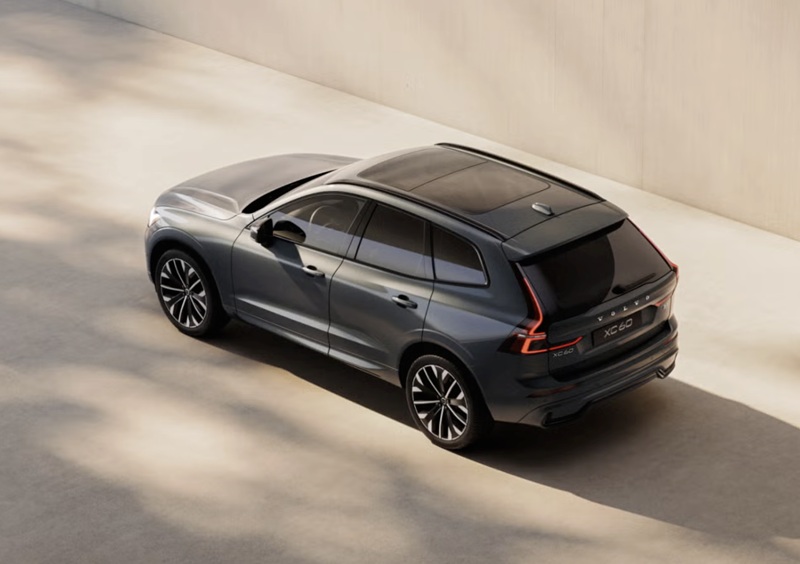
Rickenbaugh Volvo Cars – Does the 2026 Volvo XC60 Support Apple CarPlay and Android Auto around Aurora, CO?
The 2026 Volvo XC60 makes everyday driving around Aurora, CO feel seamless by supporting both Apple CarPlay and Android Auto while also featuring Google built-in on its standard 11.2-inch center display. If you have been wondering how these systems work together, which one you should use day to day, and how to get everything set up for I-225 commutes or weekend runs to Southlands and DIA, our team at Rickenbaugh Volvo Cars is here to walk you through it.
In short, you can plug in your iPhone for Apple CarPlay or your Android phone for Android Auto to mirror familiar apps for music, messages, and navigation. At the same time, the XC60’s native Google built-in experience gives you Google Maps, Google Assistant, and Google Play directly in the vehicle, no phone required for core functions. Used together, you get flexibility for how you want to drive without giving up the features you already love.
What’s included on the 2026 Volvo XC60
Every 2026 Volvo XC60 — Core, Plus, and Ultra — comes with the 11.2-inch center display running Google built-in. That means Google Maps, voice control with Google Assistant, and access to compatible apps via Google Play are integrated into the vehicle. Apple CarPlay is standard and works via a wired connection. Android Auto is also supported when you connect your Android phone to the USB-C port.
This hardware and software combination is designed to be simple and familiar. Whether you prefer the straightforward native Google experience for navigating I-70 traffic or you rely on Apple Music playlists through CarPlay, the XC60 lets you choose your ideal setup every time you drive.
How Google built-in, Apple CarPlay, and Android Auto work together
Think of Google built-in as your always-available foundation — it lives in the car and is ready the moment you start the XC60. Apple CarPlay and Android Auto ride on top of that foundation when you plug in a compatible phone. You can move between them based on what you need, without losing access to the XC60’s core menus and vehicle settings.
For instance, if you start a route to Cherry Creek State Park with Google Maps in the car, you can keep using it hands-free with Google Assistant. If you prefer Apple Maps or Waze on your iPhone, plug in and launch Apple CarPlay to mirror those apps. Android users can do the same with Android Auto — ideal if you already have saved places in your Google account.
When to use what — real-world tips for Aurora, CO
We help XC60 owners choose the best option for each drive by focusing on what matters most that day. Here are practical scenarios we see from customers in Aurora and across the Denver metro:
- Daily commutes on I-225: Use Google built-in for voice-first navigation and live traffic without plugging in, or Apple CarPlay/Android Auto if you want your phone’s messaging and playlists front and center.
- Airport runs on Peña Boulevard: Keep Google built-in active for turn-by-turn and lane guidance, and plug in your phone if you want to queue a podcast in CarPlay or Android Auto.
- Weekend drives to the foothills: Download offline Google Maps in the car for patchy coverage, or run offline maps from your phone in CarPlay/Android Auto as a backup — either path works.
- Shared vehicle with multiple drivers: Let each driver plug in their phone to instantly surface their own contacts, texts, and playlists without changing vehicle profiles.
Apple CarPlay — quick setup for your iPhone
Getting Apple CarPlay working in the 2026 XC60 is straightforward. You only need a quality USB-C cable and a compatible iPhone. Once you connect, CarPlay launches in the center display, and you can use Siri for hands-free control.
- Confirm compatibility: Apple CarPlay works with iPhone 5 or newer running iOS 8 or later — update to the latest iOS for the best experience.
- Use a data-capable cable: Connect your iPhone to the XC60’s USB-C port with a cable designed for data, not just charging.
- Allow permissions: When prompted, allow CarPlay access on your iPhone and in the center display to enable mirroring.
- Organize your apps: Arrange CarPlay apps on your iPhone so your go-to navigation, music, and messaging apps are easy to tap.
- Go voice-first: Press and hold the steering-wheel voice button for Siri — perfect for sending a quick text when traffic slows near the I-225/I-70 interchange.
Android Auto — quick setup for your Android phone
If you are an Android user, Android Auto provides a familiar app layout and voice control through your phone. The 2026 XC60 supports Android Auto when you connect via USB-C.
- Check your phone and apps: Make sure your Android phone is compatible and that Android Auto and Google apps are up to date.
- Connect with USB-C: Use a robust, data-capable USB-C cable and plug into the XC60’s USB-C port to launch Android Auto.
- Grant permissions: Approve prompts on both the center display and your phone so Android Auto can mirror properly.
- Customize your launcher: Reorder Android Auto apps on your phone for quick access to your favorites like Spotify and Waze.
- Use voice commands: Tap the steering-wheel voice button for voice commands — ideal for quick destination changes near Southlands when plans shift.
Audio, voice assistants, and notifications — keeping it simple
When you plug in, your phone’s audio source becomes available alongside built-in sources like the radio or the available Harman Kardon Premium Sound System on XC60 Ultra. You can quickly switch between built-in Google Maps and CarPlay or Android Auto navigation without losing guidance.
For voice, the steering-wheel button lets you use Google Assistant for in-vehicle features and navigation, or activate Siri or your phone’s Google Assistant when CarPlay or Android Auto is in use. Notifications appear in a streamlined format so you can decide whether to reply hands-free or wait until you park — a thoughtful touch for busy Aurora streets and school pickup lines.
Troubleshooting and best practices
If something does not connect the way you expect, these quick checks usually solve it. Our team can also help at Rickenbaugh Volvo Cars — we set up phones for customers every day.
- Use the right cable: Many issues come from charge-only cables — swap to a certified, data-capable USB-C cable.
- Update software: Make sure your phone’s OS and apps are current; updates often improve stability and add features.
- Re-enable permissions: If CarPlay or Android Auto will not launch, unplug, restart your phone, and confirm permissions again.
- Set a default nav app: Choose your preferred app in CarPlay or Android Auto so route prompts behave consistently.
- Avoid cable strain: Keep cables tidy in the console to prevent intermittent disconnects on bumpy stretches of Alameda or Iliff.
Why this matters for life around Aurora, CO
Local driving puts a premium on reliable navigation, real-time traffic, and quick access to music and messages. Between I-225 congestion, E-470 toll routes, and frequent runs to DIA, seamless tech saves time and reduces stress. The XC60’s combination of Google built-in with Apple CarPlay and Android Auto means you can choose the tool that fits your day — and switch without friction when plans change.
It is also a great fit for households with mixed devices. If one driver uses an iPhone and another carries an Android phone, each can plug in and feel at home immediately. With Volvo’s intuitive interface and clean layout, the cabin stays uncluttered and easy to operate even when you are juggling errands from Stanley Marketplace to Tallyn’s Reach.
See it in action at Rickenbaugh Volvo Cars
We invite you to try Apple CarPlay, Android Auto, and Google built-in side by side in the 2026 Volvo XC60 at our Denver showroom, a quick drive from Aurora. We will help you connect your phone, set a couple of common destinations, and test both voice assistants so you can decide what feels most natural. While you are here, explore available features like Pilot Assist, the 360° camera, Full LED headlights in Volvo’s signature Thor’s Hammer design, and the spacious, flexible trunk with its power-operated tailgate.
If you already own a Volvo and want help optimizing your setup, our service team can update software, check cables and ports, and answer any questions. As your local Volvo resource, we keep the experience simple and tailored to how you drive.
Frequently Asked Questions:
Is Apple CarPlay standard on the 2026 Volvo XC60?
Yes. Apple CarPlay is standard on all 2026 XC60 trims and works via a wired USB-C connection. It is compatible with iPhone 5 or newer running iOS 8 or later, and we recommend updating to the latest iOS for the best experience.
Does the 2026 Volvo XC60 support Android Auto?
Yes. Android Auto is supported when you connect a compatible Android phone to the XC60’s USB-C port. Make sure Android Auto and your Google apps are up to date, and use a data-capable cable for reliable mirroring.
How does Google built-in differ from Apple CarPlay and Android Auto?
Google built-in runs directly in the XC60 with Google Maps, Google Assistant, and access to compatible apps through Google Play. Apple CarPlay and Android Auto mirror select apps from your phone. Many drivers in Aurora use Google built-in for fast startup navigation and plug in a phone when they want their personal music, messages, or alternate map apps.
Can I use voice commands with all three — Google built-in, Apple CarPlay, and Android Auto?
Yes. The steering-wheel voice button lets you use Google Assistant in the car, or you can access Siri through Apple CarPlay and your phone’s Google Assistant through Android Auto. It is easy to keep your hands on the wheel and eyes on the road while sending messages or adjusting routes.
Do I need a data plan for navigation and streaming?
Using Apple CarPlay or Android Auto relies on your phone’s data plan. Google built-in can provide navigation and voice features directly in the car, and you can also save offline maps as a backup for areas with spotty coverage.
Will using CarPlay or Android Auto interfere with safety features like Pilot Assist?
No. Smartphone integration operates alongside driver support features. Systems such as Pilot Assist, the 360° camera, and Full LED headlights with Thor’s Hammer design continue to function independently while you use CarPlay or Android Auto.
Ready to experience the 2026 Volvo XC60’s tech for yourself? Visit Rickenbaugh Volvo Cars at 777 Broadway in Denver — minutes from Aurora — and we will get your phone set up, demonstrate Google built-in, and help you decide the best everyday setup for your drives. We are here to make premium ownership easy, from your first test drive to every service visit.
0 comment(s) so far on Does the 2026 Volvo XC60 Support Apple CarPlay and Android Auto around Aurora, CO?